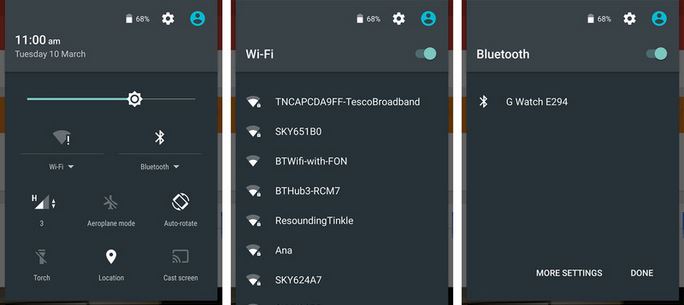
Android OS new version Coming Soon. It will be Android N name. Android 6.0 is now marshmallow and approx 1.3 percent of Android devices available around the world. Android is being brought by the code name N, which are some screen shots leaked.

Screenshots of Android N not much different from the marshmallow. While still too early to say anything about it because no official has made a statement of this screen to Android N.
According to me it will be Android Nutella 7.0
android-lollipop-5.1-features-changeA few days ago Google released the much-awaited update for its Android Lollipop operating system i.e. Android 5.1 Lollipop. This 5.1 update has brought certain changes and bug fixes to the operating system. These changes include new animations, tweaks in settings and new instructions. Take a quick look at the new features in Android 5.1 Lollipop:

New Animations:

Just when you were getting used to the newer feel of the Android 5.0 Lollipop OS, Google decided to give away a whole set of new animations in 5.1 update. These are minor animations and you’ll appreciate them for sure. Clock app, alarm, auto-rotate- everything has got some subtle animation updates.

Tweaks in Settings:

Another significant change in Android 5.1 Lollipop update is the tweak in quick settings panel. WiFi and Bluetooth settings now have new options that let you choose new Bluetooth and WiFi connections from the settings panel without going inside the complete setting menu.
android-lollipop-5.1-features-changes

Screen Pinning Makeover:

Newer screen pinning was already a cool way to lock apps in 5.0, but with Android 5.1 Lollipop, the feature is revamped with clearer instructions.

Device Protection:

With Device Protection in Android 5.1, you will be able to ensure better privacy standards. Your Android device will remain locked until you access your Google account and sign in- even if a person resets the factory setting on your phone. This will make Android devices more secure than ever.android-lollipop-5.1-features-changes-

Separate Controls for Media and Phone Volume:

Google has made changes in the volume settings with “Downtime” feature and new functionality with “None”, “Priority” and “All” buttons. Now you can quickly access the volume slider during some media playback and tapping on a new bell icon named “All” will expand this to usual notification panel.
android-lollipop-5.1-features-changes--

Dual SIM and HD Support:

Now Android 5.1 Lollipop gives you an option to use more than one SIM cards. Also, the newer high definition voice feature on compatible phones has been baked into this latest Android OS update to let you enjoy high-quality calls.hd-calling-android-lollipop-5.1-features-changes

Other changes in Android 5.1 Lollipop update:

  • Improvements in “Heads-up” notifications.
  • New status bar icon when there’s no SIM.
  • The memory leak bug reported by some users in likely to be fixed.
  • Customizable colors in dialer for different contacts.
  • The default icon too has been updated in Android 5.1 Lollipop update.
Download the Android 5.1 Lollipop factory images right away from the link given below:
Android 5.1 Lollipop 

Now run your favorite Android apps on your Computer.

All you need to do is to download and install the utility, and you are ready to run your favorite Android apps and games on your newly upgraded Windows 10 PC/Laptop. It requires no configuration and there is no messing about. All you have is a 100 percent native Android operating system running on your Windows 10 PC or tablet (also supports Windows 7/8/8.1). Enjoy the full Android experience that includes a full-featured software keyboard, gesture support for pinch and zoom and multi-touch, and even compass and GPS functionality, which lets you to run navigation and mapping apps.
In contrast to a dual-boot solution, AMIDuOS uses virtualization technology, which allows you to switch between Windows and Android apps smoothly without the need to close the work that you are doing in one OS to get to the other.
For easy access, you can even put shortcuts to Android apps on the Windows Start menu.
windows
Virtualization also makes it easy to share file between Windows and Android without any limitation between you and your data. AMIDuOS also supports SD card emulation and lets you set up the SD card using an easy-to-use configuration tool.
AMIDuOS comes pre-installed with stock Android apps and the Amazon App Store. Further, you can also easily install the Google Play Store to get access to popular apps such as Gmail. There is also a quick and easy way to enable root mode for power users.
AMIDuOS comes in two versions, Jelly Bean and Lollipop and with an initial 30-day free trial offer, then and beyond that a lifetime license will cost you $10.
AMIDuOS requires the following modest system specs:
  • x86 processor
  • 32 or 64-bit Windows 7/8/8.1
  • OpenGL 3.0 and above
  • Hardware Virtualization Technology needs to be enabled in BIOS
  • Minimum 2GB of system RAM, though 3GB is suggested for best performance
  • Minimum 2GB of hard disk free space
Interested, download AMIDuOS from here.
Its universal, you can hide any file, virus or Trojan or anything behind image using this trick.


Things that you will need for this trick:
1. Winrar installed on your system.
2. Little knowledge of command prompt.


1. Create an folder into C drive (recommendation is that use this C:\Hidden).

2. Now gather all files that you want to hide in this folder.

3. Now add these all files to compressed .rar file using winrar
(example myhiddenfiles.rar ).
Note: This rar file should be in the same directory (i.e. C:\Hidden)

4. Now Select the JPEG file that you want to use to hide the above content
(say myimage.jpg). Put this image file also in the same folder that is in C:\Hidden

5. Now, open Command Prompt (Go to Run and type ‘cmd‘). Make your working directory C:\hidden.
(When you open CMD you will get like C:\Documents and settings\username (something like this)
Now type cd.. and press enter and then again type cd.. and press enter. Now you have something like this in cmd C:\ . Now in front of that type cd "Hidden" and press enter. )

6. Now type: “COPY /b myimage.jpg + myhiddenfiles.rar outputimage.jpg” (without quotes) - Now, myimage.jpg is the picture you want to show, myhiddenfiles.rar is the file to be hidden, and outputimage.jpg is the file which contains both....

7. Now, after you have done this, you will see a file output.jpg in C:\hidden. Open it (double-click) and it will show the picture you wanted to show. Now try opening the same file with WinRAR, it will show the hidden archive...

This Trick will help us to hide things behind the JPG file without any software. i hope you all have liked it.


Top 10 Antivirus Of 2015 To Secure You Windows PC Or Laptops


1. Bitdefender Antivirus Plus
2. Kaspersky AntiVirus
3. Norton AntiVirus
4. AVG Antivirus
5. Panda Antivirus
6. ESET Antivirus
7. Avast Antivirus
8 Avira Antivirus
9. McAfee
10. F-Secure 2015


Comparisons of World’s Top Antivirus Software 

Points  Plus Kaspersky Panda Pro AVG Norton ESET Avira Avast McAfee F-Secure 2015
Real-time Excellent Excellent Excellent Excellent Excellent Excellent Very Good Excellent Very Good Very Good
Manual Scanning Excellent Excellent Very Good Excellent Excellent Very Good Very Good Excellent Very Good Excellent
Virus Removal Excellent Excellent Very Good Excellent Excellent Good Good Very Good Good Good
USB Scanning Good Excellent Good Very Good Very Good Excellent Good Very Good Good Average
Anti-Spyware Very Good Very Good Good Very Good Very Good Excellent Average Good Average Good
Tech Support Good Good Poor Very Good Very Good Good Good Average Good Average
Resource Usage Very Good Very Good Very Good Excellent Excellent Average Very Good Good Good Average
User Interface Very Good Good Very Good Very Good Excellent Excellent Good Very Good Average Good
Installation Excellent Very Good Good Good Average Good Good Very Good Poor Average
Guarantee 30 Days 14 Days 30 Day 30 Day 60 Days 30 Days 30 Days 30 Days 30 Days 30 Days

Note: If any question, kindly ask me without any hesitation.


Review:

Adobe Photoshop Portable CS6 is photo-editing software developed by Adobe. This program is available for both Windows PC and Mac. Although Photoshop is designed for professional work, it can also be used to fix your images even if you've never used this kind of program before. New users can perform simple adjustments to their photos, while other more complex tasks may require some tutorials first. However, practice can be more useful than tutorials, so we strongly recommend that you spend a couple of hours experimenting to improve your outcomes, instead of just watching video tutorials on the Internet.

Adobe Photoshop Portable CS6 Features

Check the features of this program before you download it:
  • Compatible with Adobe Touch Apps and files from previous standard editions such as CS3, CS4 and CS5
  • Camera RAW 7: take advantage of this powerful plug-in and control the quality of your photos using Raw files
  • Mercury Graphics Engine: work on your images faster than ever with this new graphics engine
  • Video-editing features: edit your videos as you do with photos and export them using popular formats such as H.264 or MPEG4
  • Expanded and re-imagined tools: try the new crop tools, content-aware tools, blur tools and many more
  • Download new assets and templates for quick productivity and additional retouching functionality for the users
  • Advanced and faster 3D image edition motor improving the system’s performance with excellent precision to apply

System Requirements

The minimum system components required to download and run this program are:
  • Operating system: Windows XP 32-bit or 64-bit or higher
  • Processor: Intel Pentium 4 or AMD equivalent
  • Graphic Card: OpenGL 2.0 support
  • Memory: 1GB RAM or higher
  • Hard disk: 1 GB free space available

RJ Abdullah Sherwani


We all know that after loading the file or copying the file from the boot disk to temporary space the system requires a first time reboot.
we can bypass the 39 minute of time while we are installing windows xp.
It look like as....
Now if we press shift+f10 then the task manager will open and there we will find that a process is running named setup.exe
It look like as.....
Now our task is to make the priority of this process "High" by right clicking on that.
Follow this screen shot.
Well done we successfully set priority. Now it will consume 10 mins for installation.

Note: Time consumption also depends on system speed. If system up to date and high speed then it will take time less then or approx 10 min only. If system speed slow and old model then it will take time more than 10 min.

If any problem in process then freely ask me. :)


We welcome you on our web. You can download this game from mediafire in RAR format.
Here the some features of this game....

Tekken 6 Minimum System Requirements:

Operation System: Windows XP SP 3/Vista/7/8
CPU: Pentium 4
Processor: 2.6GHz or AMD Athlon 2600+
RAM Memory: 1 GB
Graphics Card: 256 MB with Pixel Shader 3.0+ (Required)
Hard Drive Space: 14 GB
Sound Card: Windows Direct X 9.0 Compatible
DirectX: Version 9.0
Mouse and Keyboard

Tekken 6 Recommended System Requirements:

Operation System: Windows XP SP 3/Vista/7/8
CPU: Pentium 4
Processor: Core 2 Duo 2.4GHz
RAM Memory: 2 GB
Graphics Card: 512 MB with Pixel Shader 3.0 (Required)
Hard Drive Space: 14 GB
Sound Card: Windows Direct X 1.0 Compatible
DirectX: Version 10.0
Mouse and Keyboard
Full version game
(353.37 Mb)


Are you worry about this type of message in my computer?
Drive "Access is denied" message?
Don`t worry about it. I will give you solution of it.
 
First of all open Command Prompt
 Start>Run=type("CMD" without " ") enter.
Or
Press Windowkey+R

Follow these steps for get access of your drives:

1. go to C: by typing C:>cd c:
2. type C:>attrib -S -H -R autorun.inf
3. delete the file by typing C:>del autorun.inf
4. goto drive D: by typing C:>d:
5. repeat step 1,2 and 3
6. do the same in all your drives (say you have C,D,E,F).
7. Close the DOS command window
8. Open task manager and "end task" the explorer.exe in the processes tab
9. From Application Tab in taskManager, select "new Task" button, type "explorer.exe"


Game Description:

You've got a chance to try yourself as a well known modern fashion designer. Dress Up the Pretty Barbie. Show your fashion style.


System Requirements:

  • Windows 2000/XP/Vista
  • 700MHz
  • 512 MB RAM


Pretty Barbie Dress Up - Download Full Version Free
Full version game
(14.1 Mb)

The steps for removing password from PDF files are as follows:
  • Step 1: The first step in order to remove password from a PDF file is to go to the “Batch PDF Documents Security” option. Once you find this option and select it you have to click on the “next button”.
  • Step 2: After clicking on the “next button” of the “Batch PDF Documents Security” option, a new window appears. Here you have to click on the “Add” button. The Add button will help you to add that particular encrypted PDF that you want to remove the password from. It is very convenient.
  • Step 3: The third step after addition of the encrypted PDF file to click on “Try Passwords” button. The try passwords button will begin to delete the PDF password. The Password pool will automatically try passwords under the surveillance of password security. This way the PDF password will very easily be removed.
  • Step 4: The fourth and the last step is to click on the “next button”. A Check Box for “Security level” will appear and you have to click on NONE


98% Questions of Annual paper in 2015

 Picture 1

Short Questions by: Sir Abdullah Sherwani 

Remember me in your prayers

 Picture 2

  Long Questions by: Sir Abdullah Sherwani 


Note: Due to time shortage i am unable to convert these question in English. It is simple you can also translate these questions in English. But don`t forget to prepare all questions from my Notes. Best of luck for your paper.

Internet Download Manager 7.1 Full Ver is the best software tool you can ever find online free of cost.Software download is really easy now as they can be used anywhere online you just need to give them best links to download. This is the best Internet Download Manager Full Patch tool Free Download. This is a free softwares for download on your computer or laptop so install it right away after downloading it. So no more worries that how to download free softwares as you have this best website now.

Abdullah Sherwani

Now we introducing WinRAR is an archiving utility that completely supports RAR and ZIP archives and is able to unpack CAB, ARJ, LZH, TAR, GZ, ACE, UUE, BZ2, JAR, ISO, 7Z, Z archives. It consistently makes smaller archives than the competition, saving disk space and transmission costs.


It offers a graphic interactive interface utilizing mouse and menus as well as the command line interface. WinRAR is easier to use than many other archivers with the inclusion of a special "Wizard" mode which allows instant access to the basic archiving functions through a simple question and answer procedure.


It offers you the benefit of industry strength archive encryption using AES (Advanced Encryption Standard) with a key of 128 bits. It supports files and archives up to 8,589 billion gigabytes in size. It also offers the ability to create selfextracting and Multivan archives. With recovery record and recovery volumes, you can reconstruct even physically damaged archives.


Dowload Here

Chat Room


Author image

About the Author :

Electronics Engineer at @Pureline Electronics. Lover of Information Technology, circuits, startups, and people.

Connect with him on :

Visitor Counter

Radio Online